
Build a Document Q&A Knowledge Base with OpenAgent
Upload a sample employee handbook, generate embeddings, and verify document-grounded answers and source citations in OpenAgent with screenshots.
A general chatbot does not know your organization's policies. In this tutorial, you will give an OpenAgent assistant a small employee handbook, generate searchable vectors, and check that answers come from the uploaded file.
You will finish with: an answer containing the fictional equipment allowance of USD 480, its approval and receipt rules, and an inspectable knowledge source.
Before you start
- Complete Self-host an AI assistant, or use an existing instance where you can create agents and providers.
- Have a working chat model and an embedding provider. They serve different purposes; a chat model alone cannot index documents.
- Download employee-handbook.md. It contains fictional data, so you can test without uploading real employee information.
The screenshot setup uses Qwen for chat and Alibaba Cloud text-embedding-v3 for embeddings. Cloud providers receive the document passages and questions they process. For a local-only deployment, use local model and embedding providers instead.
Use OpenAgent source commit b3b0ab53 or a release containing it. This October 31, 2026 change fixes signed-URL temporary files and agent-specific embedding selection. Older Windows builds can fail while generating vectors; older chat code can use the default agent's embedding configuration instead of the selected agent's. See troubleshooting below.
If your release predates the fixes
Build the fixed source with Go 1.25+, Node.js 20+, and Yarn 1.x:
git clone https://github.com/the-open-agent/openagent.git
cd openagent
git checkout b3b0ab539
cd web
yarn install --frozen-lockfile
yarn build
cd ..
go build -o openagent-tutorial .
For a fresh local source installation, edit conf/app.conf before starting: set driverName = sqlite3, dataSourceName = ./openagent.db, and leave casdoorEndpoint empty to use built-in local accounts. Run the executable from the repository root so it can find web/build and conf/app.conf. On Windows, build with go build -o openagent-tutorial.exe . and run .\openagent-tutorial.exe; on macOS/Linux, run ./openagent-tutorial. These instructions are for a new tutorial instance; do not overwrite an existing deployment's configuration or database.
1. Connect an embedding provider
In Connectors → Providers → Add, configure:
| Field | Value for this example |
|---|---|
| ID | tutorial-embedding |
| Display name | Tutorial Embeddings |
| Category | Embedding |
| Type | Alibaba Cloud |
| Sub Type | text-embedding-v3 |
| API Key | Your own Model Studio key with access to this embedding model |
Save. This example uses the Alibaba Cloud embedding implementation's DashScope endpoint. If you use another region or provider, select its supported configuration from Embedding Providers; do not assume a chat endpoint can embed text.
2. Create a dedicated handbook agent
Open Basic → Agents → Add and set:
| Field | Value |
|---|---|
| ID | tutorial-handbook |
| Display name | Employee handbook |
| Model provider | Your working chat model |
| Embedding provider | Tutorial Embeddings |
| Storage provider | The built-in local file storage provider |
| Split provider | Default |
| Knowledge count | 3 |
Keep child stores, tools, skills, and MCP server empty so this check uses only the handbook. In Prompt, enter:
Answer in English using only the retrieved handbook. Cite the source
document. If it does not contain the answer, say you do not know.
Do not invent policies.
Save the agent. This instruction helps guide the model; verify its behavior rather than treating the prompt as a guarantee.
3. Upload the sample and generate vectors
Select Employee handbook in the agent selector at the top of the page. Then open Knowledge Base → Files, click Upload, and select the downloaded employee-handbook.md.
Check the Agent column: the file must belong to tutorial-handbook, not the built-in agent. File upload and indexing are separate checkpoints. Use its row action Refresh Vectors to generate the embeddings, then refresh the list and check that the vector count is greater than zero. The current Files table shows the vector count; versions that also show processing status should reach Finished. The tiny sample should not need OCR or Office conversion.
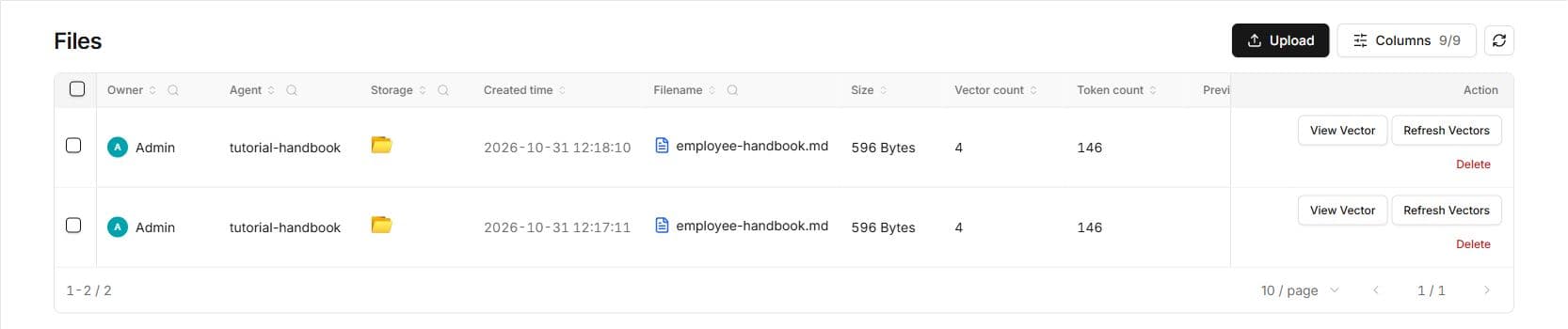
The screenshots include two uploads from repeated verification runs. You only need to upload the sample once.
You can open the file's vectors to inspect the extracted text. Confirm it includes USD 480, Manager approval, and 30 days. A successful upload alone does not prove that retrieval is ready.
4. Ask a question with a known answer
Open a new chat with Employee handbook and send:
According to the handbook, what is the annual home-office equipment
allowance, who must approve it, and when must I submit receipts?
Check the facts against the sample file:
- Up to USD 480 per calendar year for full-time employees.
- Manager approval before purchase.
- Receipts submitted within 30 days of purchase.
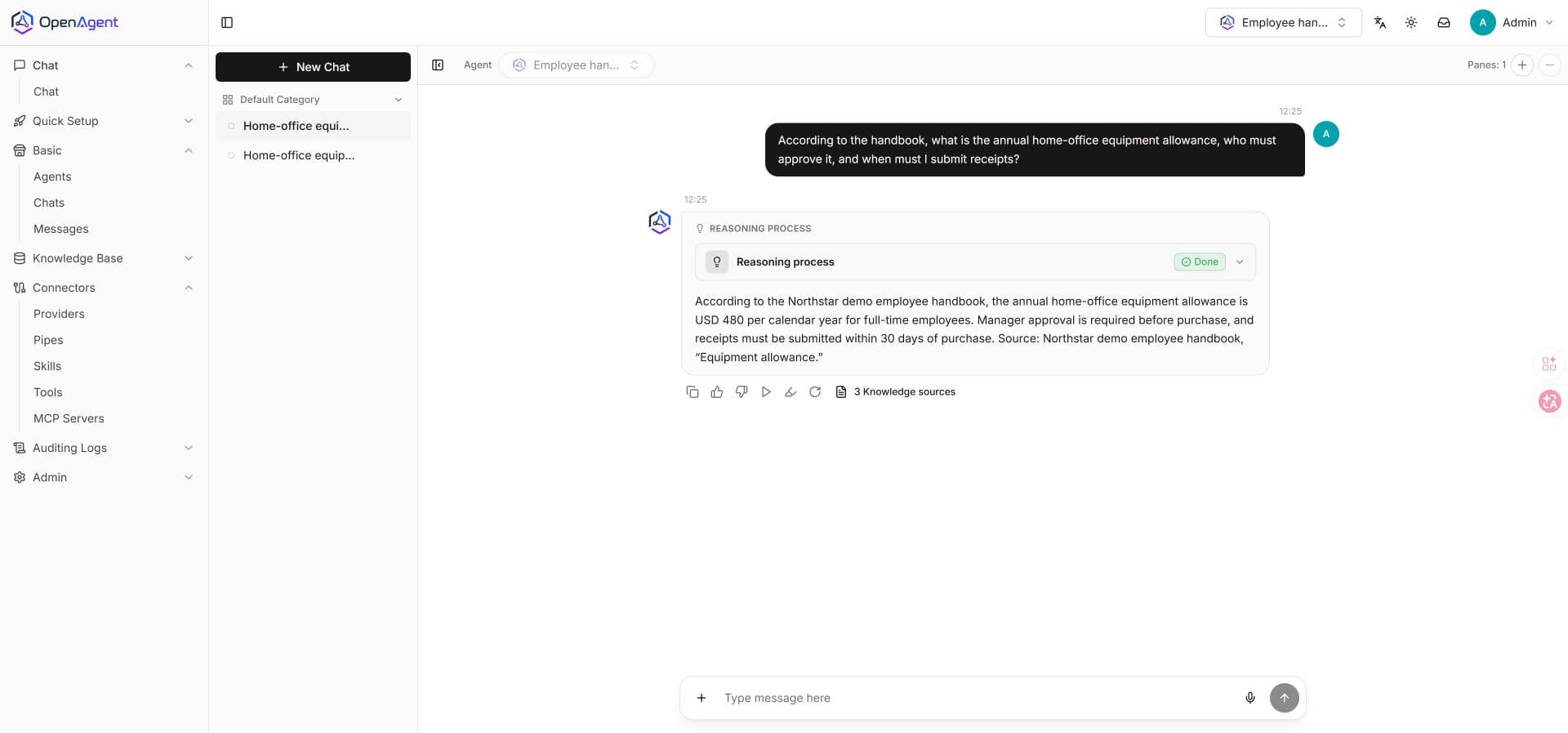
Open Knowledge sources below the answer and inspect the retrieved passage. It should identify the handbook file and contain the policy used in the answer.
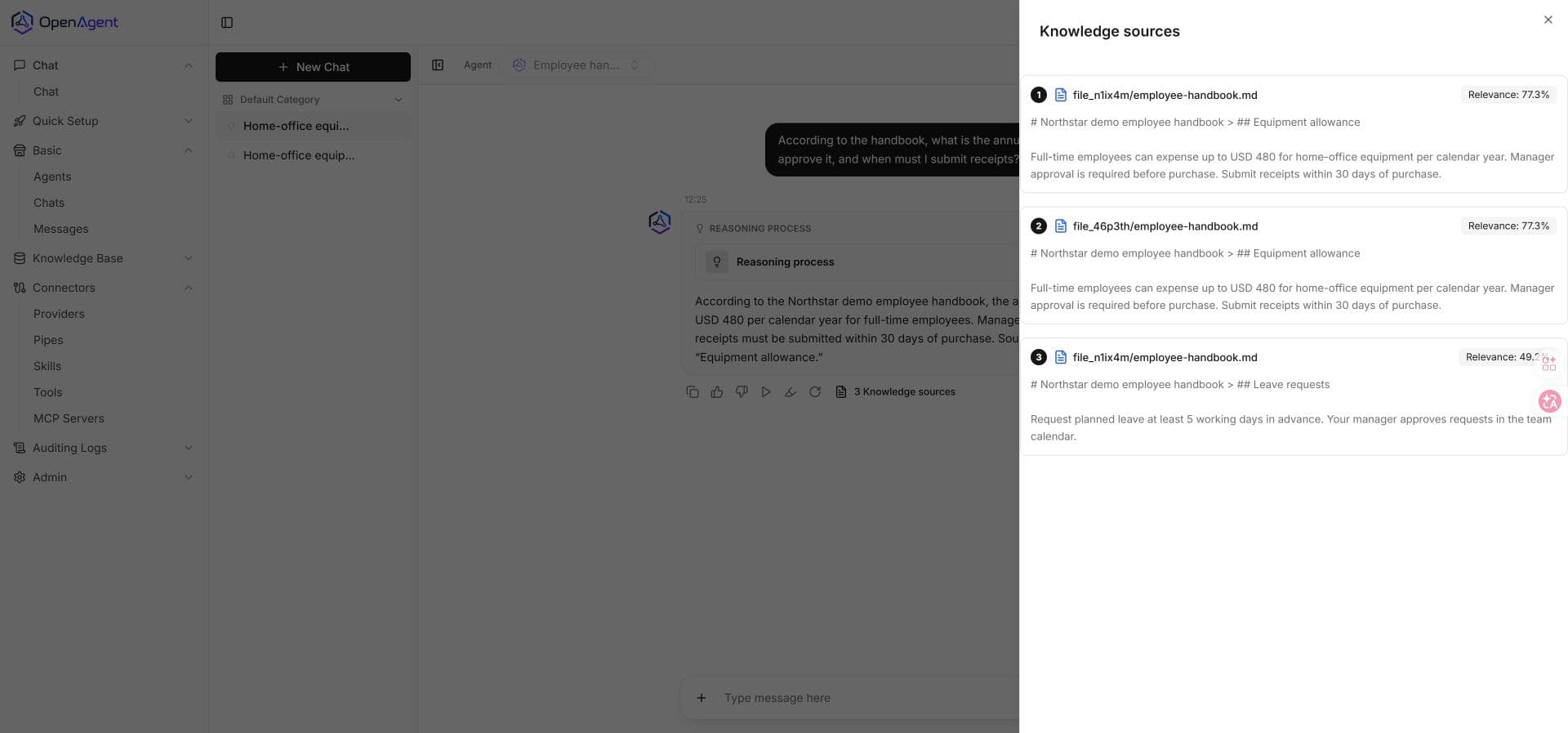
The source panel demonstrates which text was retrieved. A source badge does not automatically prove that every claim in an answer is supported; compare the actual passage and answer.
5. Test a question the handbook cannot answer
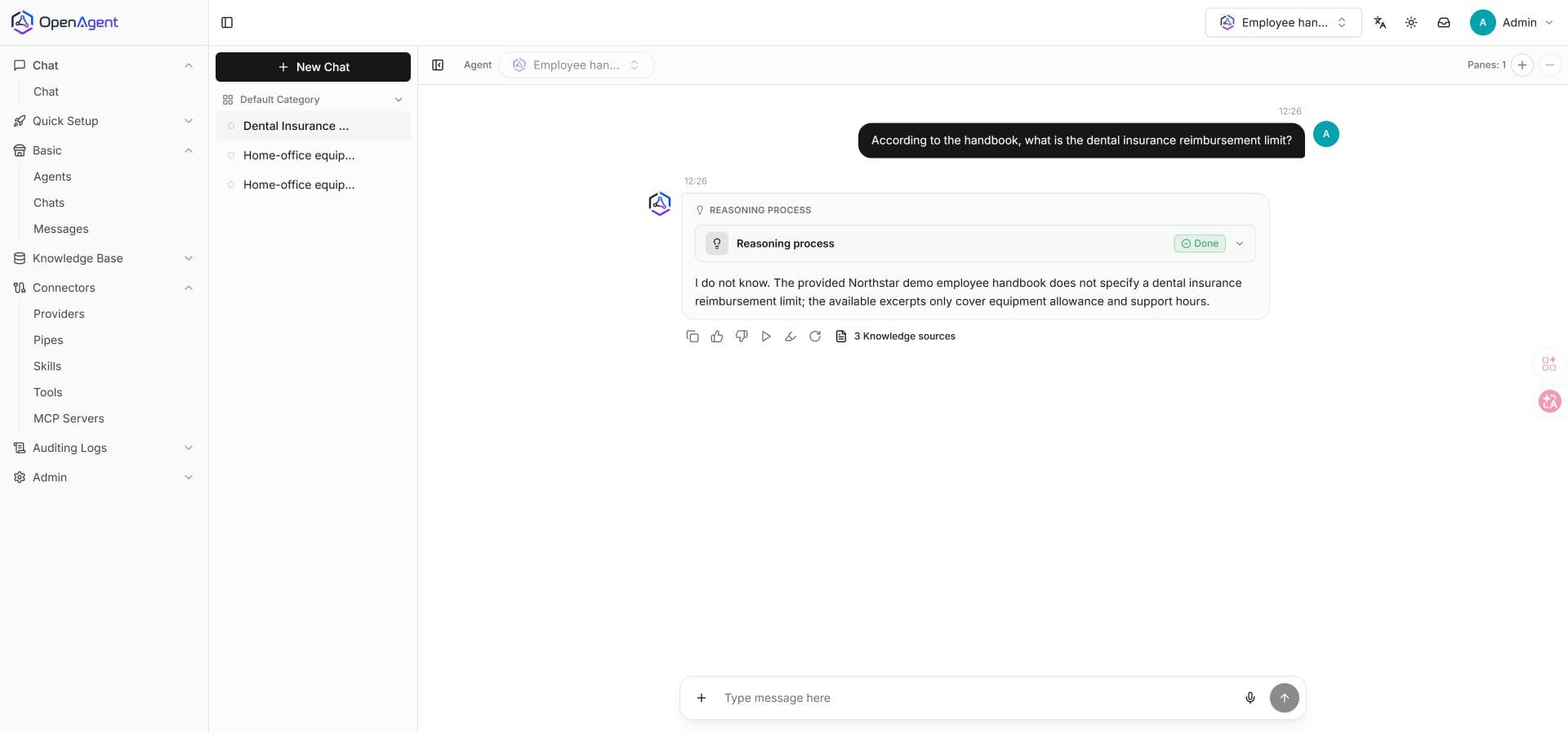
In a new chat, ask:
According to the handbook, what is the dental insurance reimbursement limit?The document has no dental policy. A passing answer acknowledges that the limit is not specified, rather than inventing a number. If the model supplies a limit, revisit the prompt and retrieved text before using this assistant for real policies.
Troubleshooting
| Symptom | What to check |
|---|---|
| File has zero vectors or stays Pending | Run Refresh Vectors from the file's row actions. |
Indexing fails with ?sig= in a Windows filename | Update OpenAgent to a build containing the October 31, 2026 signed-URL fix, then regenerate vectors. |
| Embedding request fails | Embedding provider, model access, key, endpoint, and balance. A Model-category provider is not an embedding provider. |
| No knowledge sources in chat | File status is Finished, vector count is positive, and the file and chat use the same agent. Start a new chat after changing configuration. |
| A configured embedding provider is ignored | Update to a build containing the October 31, 2026 agent-specific embedding fix. |
| Source text is empty or garbled | Inspect the vectors. Begin with this plain Markdown sample before trying scanned PDFs. |
| Results deteriorate after changing embedding models | Regenerate the existing document vectors with the new embedding provider so queries and documents use compatible embeddings. |
Use your own documents
Once both the known-answer and missing-answer checks pass, replace the sample with an approved document. Keep a small evaluation list of answerable and unanswerable questions for each revision. See Files and Vectors for ingestion and retrieval details, or connect a live MCP tool for information that changes frequently.
Self-Host an AI Assistant with OpenAgent
Run OpenAgent on your own machine, configure an LLM provider, create an assistant, and verify a real chat response with screenshots and troubleshooting.
Connect an MCP Server to OpenAgent: Order Lookup Tutorial
Run a Python MCP server, sync its tools in OpenAgent, and verify an order lookup with actual tool arguments, results, screenshots, and downloadable code.